How to Fix Thunderbird Mailbox Size Limit & Storage Issues?

Mozilla Thunderbird is a good tool if you work a lot on emails but it has a weakness. You can hit the Thunderbird mailbox size limit because of the way it stores your messages. The application starts to act differently when this happens so it becomes slow and stops receiving new messages.
The problem with Thunderbird is that it stores folders like the inbox as a single file on your computer and if the file becomes too big the folder can break it. Here we will explain the Thunderbird email storage limit and see how to fix these issues so that you do not lose important messages with the help of both manual and expert solutions.
Hide
What is the Thunderbird Mailbox Size Limit?
You need to understand what an MBOX file is if you want to understand the mailbox size limits. Thunderbird adds the email that you get to a long list inside a file on your hard drive. If you want to open your MBOX file you can use the Online MBOX Viewer Tool.
The older versions of Thunderbird have an inbox size limit of 4GB while the newer versions have a higher limit but having a folder larger than 5-10GB can be risky. You may not be able to open your emails if you go against this and keep a folder larger than 5-10GB.
Why Does this Happen?
- Single file system: All the emails that are in one folder are kept in one file.
- Compacting issues: The email is removed when you compact the folder and not when you delete it.
- Indexing errors: Large files make it hard for Thunderbird to search or list your messages.
Understanding Other Limits: Attachments and Inbox
In Thunderbird it is not just the total folder size you have to worry about, there is also a Thunderbird email attachment size limit. This is not set by Thunderbird but by your email provider like Gmail or Outlook. These providers do not let you send or receive a file that is larger than 25MB. If there are thousands of these email attachments then they can quickly add up to hit your Thunderbird email storage limit.
The Thunderbird inbox size limit is one of the most common errors that people face. The folder breaks if it gets too large because the inbox is changing and receiving data.
How to Check Your Current Folder Size?
You have to check how big your folders are before knowing how to fix the Thunderbird folder size limit problem. Use these steps to find out how big the folder is:
- Open the Thunderbird application.
- Right-click on any folder like the inbox.
- Select the Properties option.
- Look at the Size on Disk section.
If the size of the folder is close to 4GB or higher then you are reaching a dangerous Thunderbird mailbox size limit and need to take some action.
Method 1: The Compact and Archive Method
The first method to handle the Thunderbird mailbox size limit is to clean up your folders manually.
Step 1: Delete and Reduce
When you delete an email in Thunderbird, it remains in the file but you cannot see it as it is hidden. Follow the steps mentioned below to remove it:
- First delete all the old emails.
- Then right-click the folder and choose the Compact option.
- This reduces the file size and helps you to stay under the Thunderbird inbox size limit.
Step 2: Create New Folders
You should not keep everything in your inbox and create new folders. You can create many files instead of one big one by moving emails out of the inbox and this is the best way to stay below the Thunderbird email size limit.
Note: You can read this if you want to set up Gmail in Thunderbird.
Method 2: The Expert Solution to Fix Thunderbird Mailbox Size Limit
Manual cleaning can be difficult if your folders are too large. In this case the smart way is to move your data to a more stable format like PST that is used by Microsoft Outlook by using an automated tool that is designed only for this problem.
It helps you to solve the Thunderbird mailbox size limit by moving your emails from the MBOX format to a safe and organized PST file.
Why Use This Tool?
- Exports MBOX files into various formats: PST, MSG, EML, PDF, NSF, HTML, CSV.
- Software creates a separate file for each MBOX file by default.
- Provides an option to create a single PST for multiple MBOX files.
- Automatically finds where the Thunderbird emails are stored on your computer.
- Can convert single or multiple profiles at once.
Steps to Use this Tool:
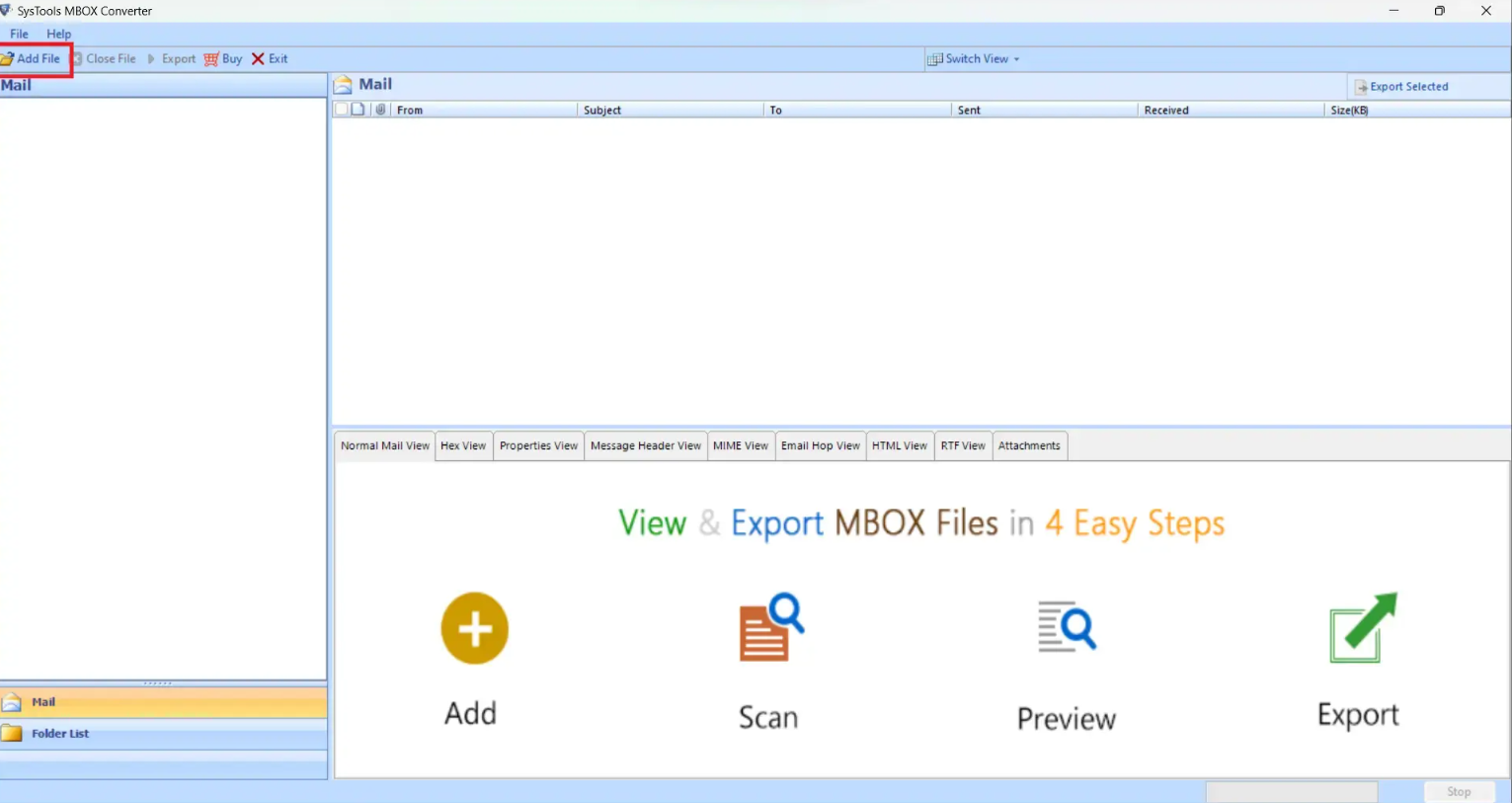
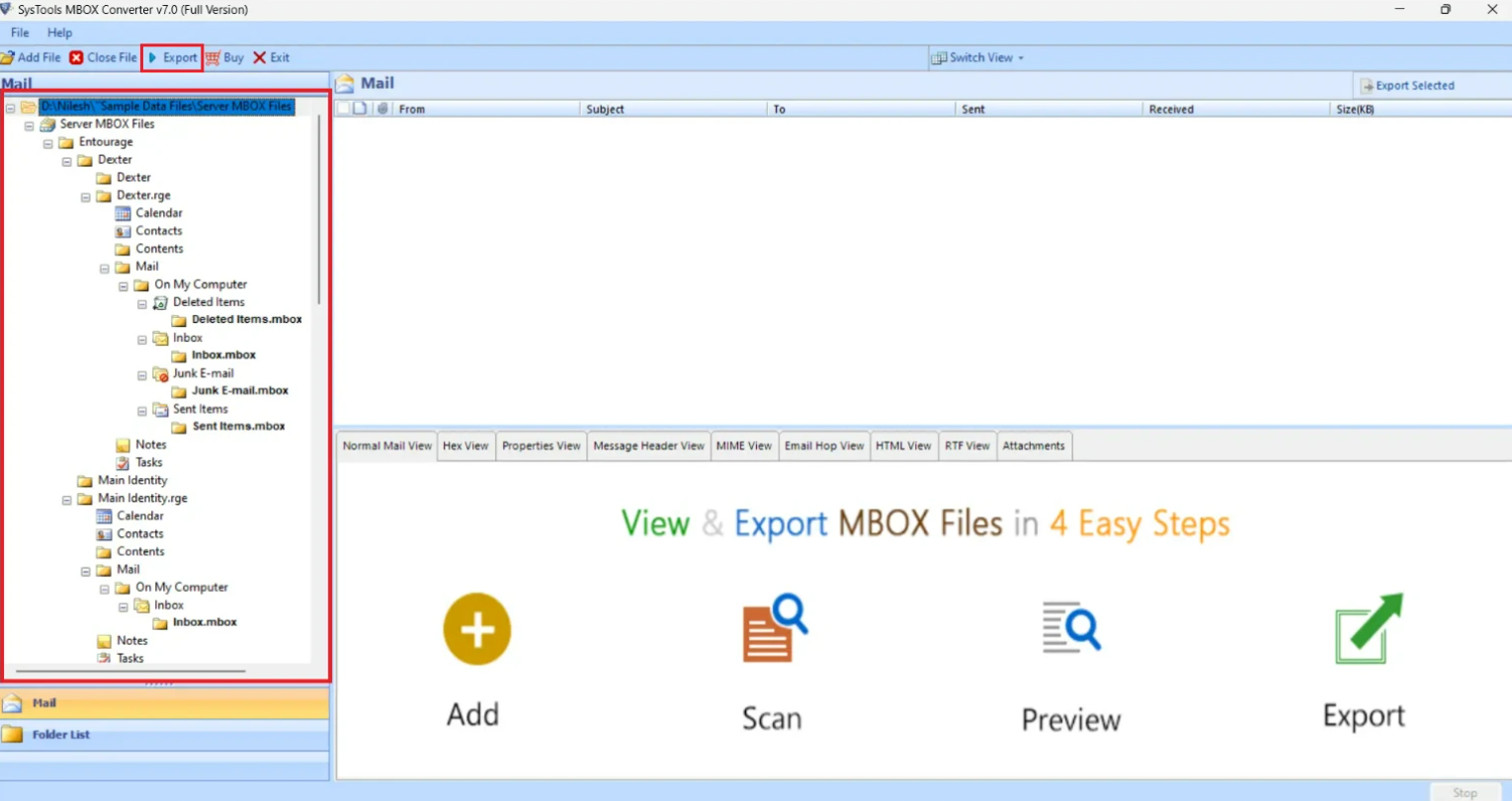
- Download and open the tool and then click on the Add File option.

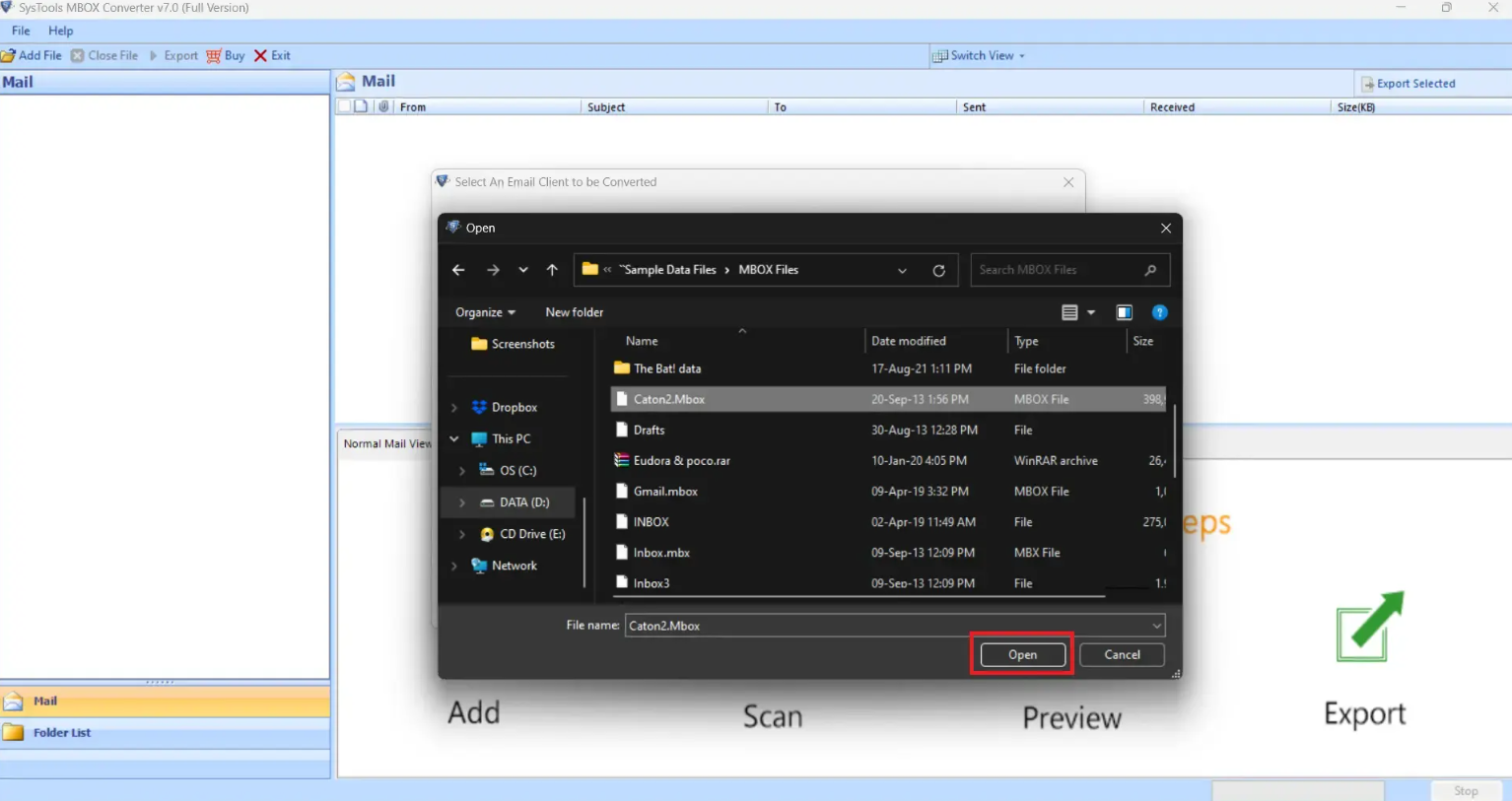
- Click on the Select File(s)/Folder from File System option. Click on Next and then select the file and click Open.

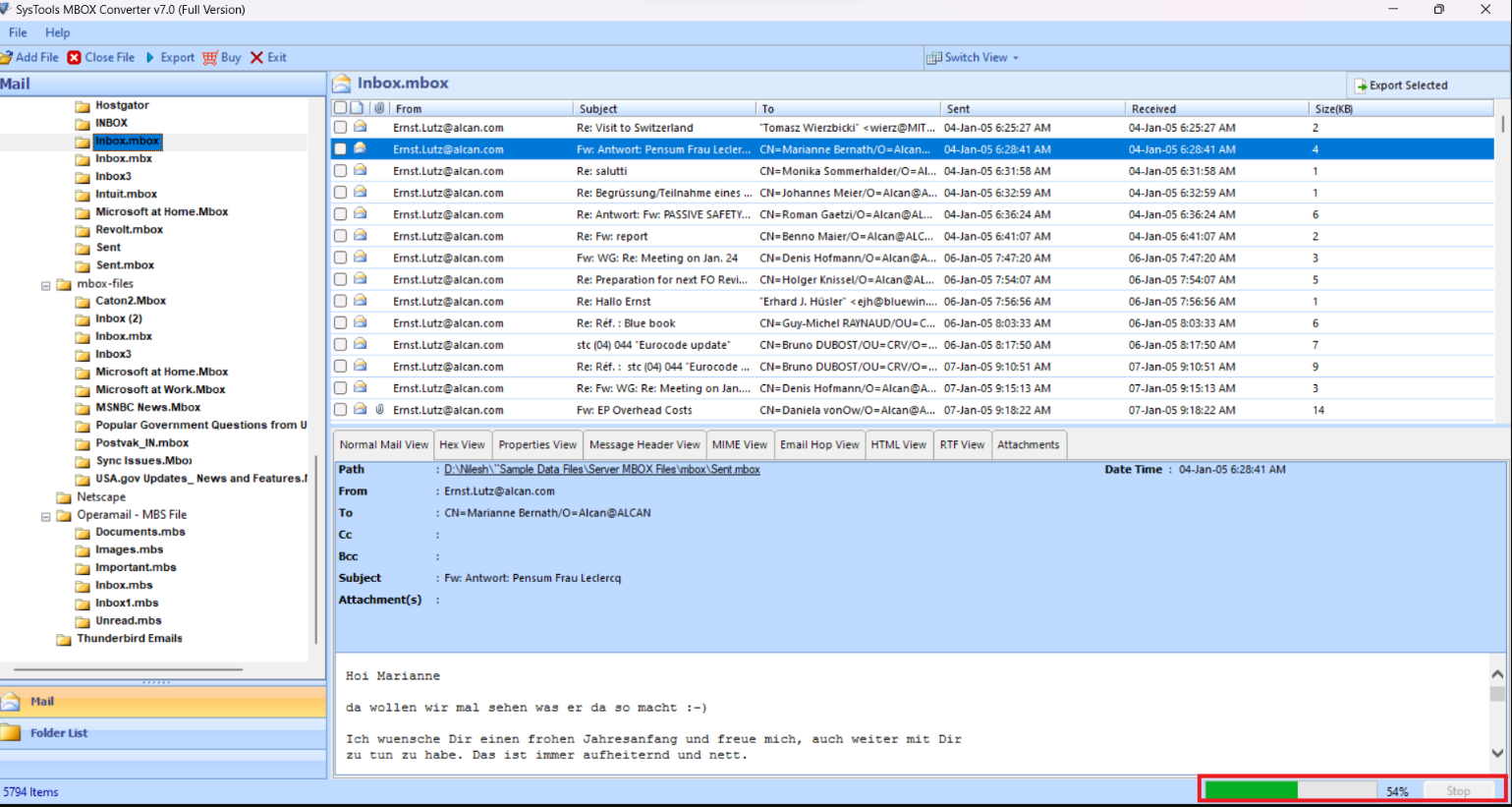
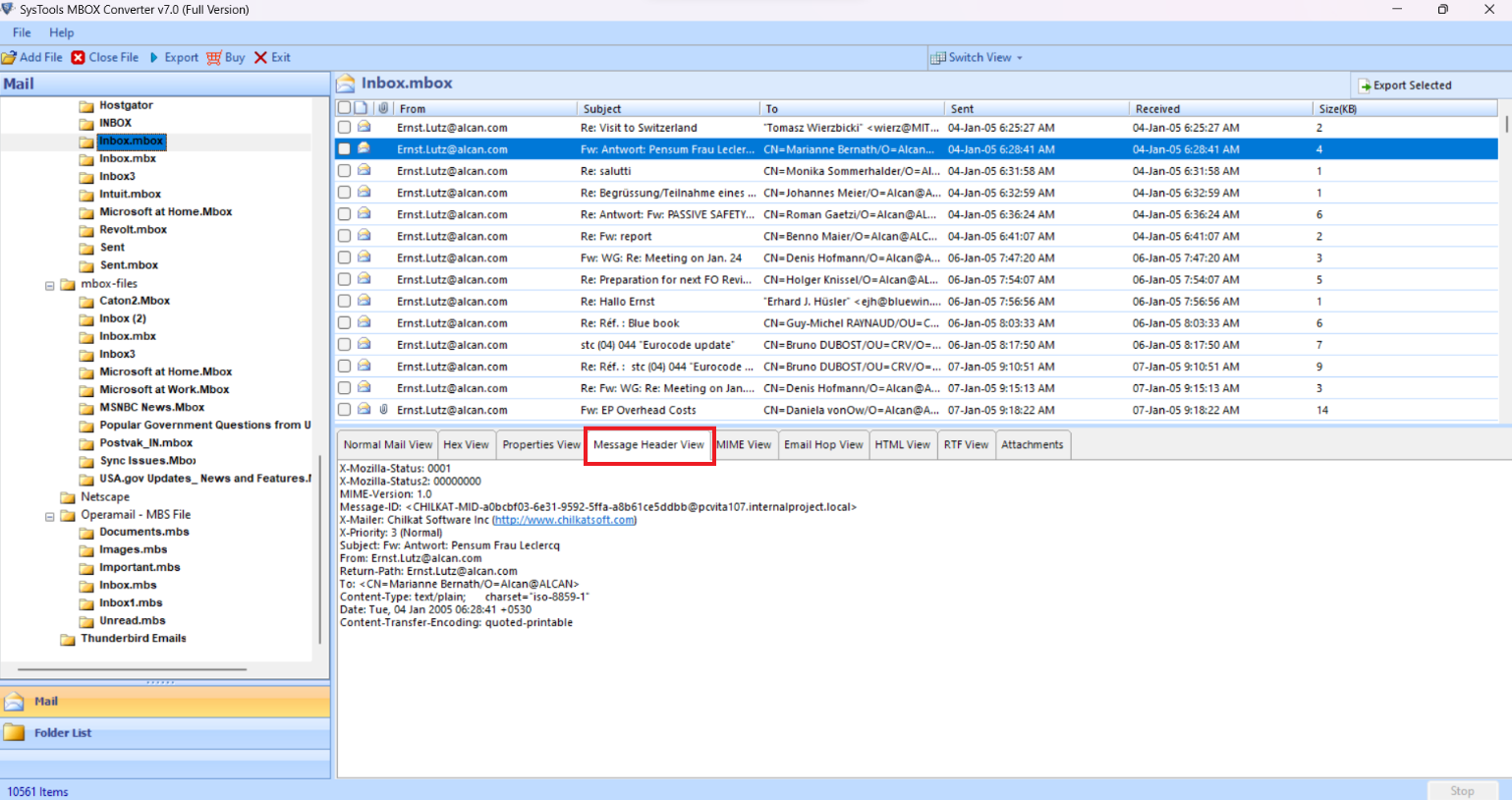
- In the Mail section click on any mailbox folder to view its emails along with the attachments. You can also stop the process in between by clicking the Stop button.

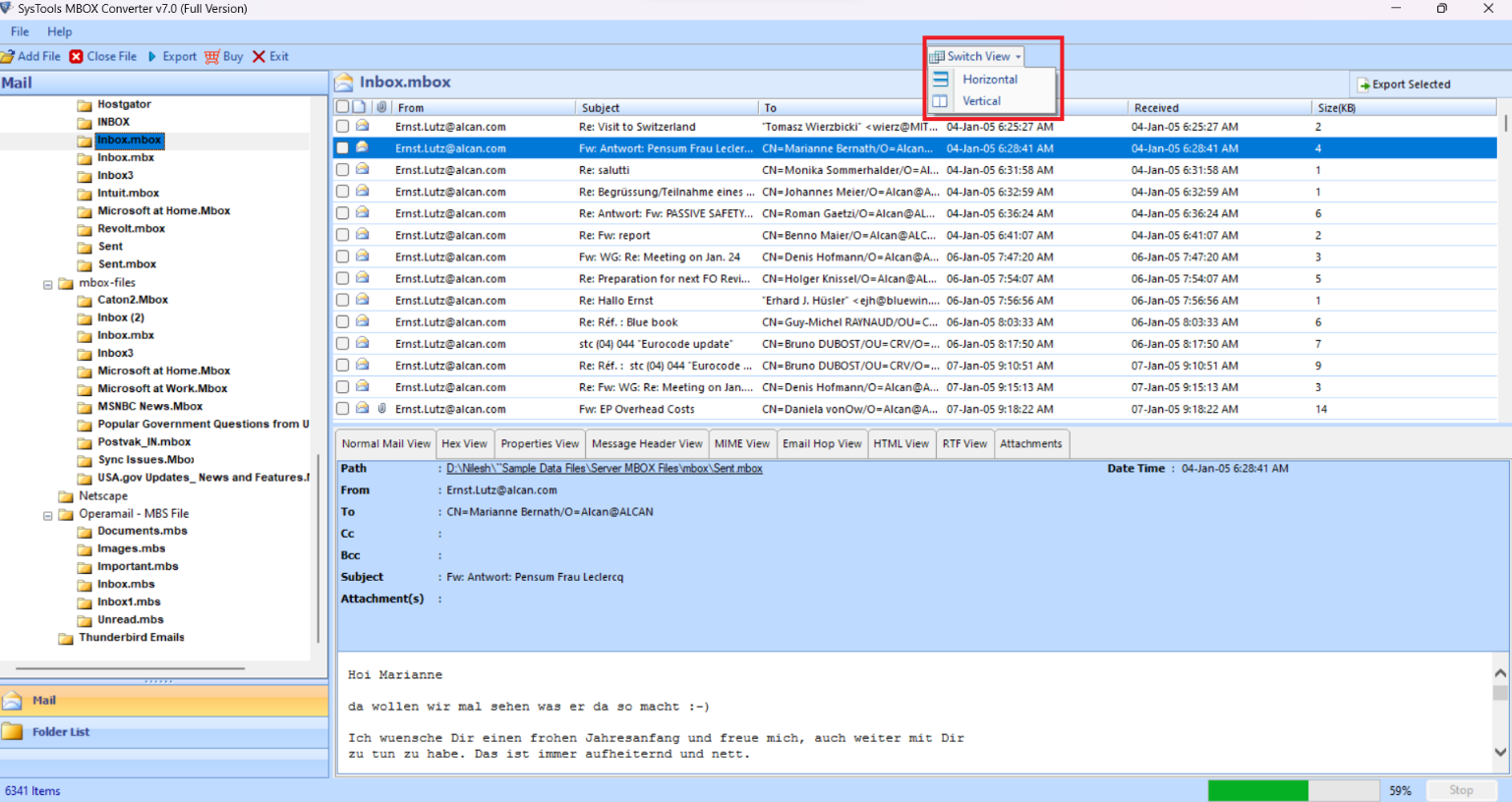
- You can also change the view mode of the emails which is Horizontal view and Vertical view.

- The Preview mode allows you to see the file in multiple views such as Normal, Hex, Properties, Message Header, MIME, Email and HTML.

- Right-click to choose the Export button or you can also select the right side Export button for bulk conversion.

Method 3: Managing Attachments Locally
You can detach the large files if you are reaching the Thunderbird email storage limit because of them. Use the following steps to manage the files:
- Open an email with a large attachment.
- At the bottom right-click the attachment.
- Then select the Detach option.
- This saves the file to the Documents folder on your computer but removes it from the Thunderbird file.
Summary
If you want to keep emails safe for the long term then it is important to manage your Thunderbird mailbox size limit. Thunderbird saves each folder as one big file on your hard drive because Thunderbird’s email storage limit exists. The Thunderbird application will slow down or break if the file gets too big compared to the inbox size limit.
You can fix this error by reducing the folder size and deleting the old emails regularly. Archiving the emails into smaller and separate folders helps to avoid the high Thunderbird folder size limit. Using the expert solution to safely move your data if your folders are too big or crashing helps to fix the file size problem.
You can avoid the stress of a full inbox and make sure that you never hit a Thunderbird email size limit again by staying active and keeping an eye on your folder sizes.
